
Editor plugins
An editor plugin runs while you edit. It can read the deck, listen for slide and selection changes, change the deck through the undo stack, and add a panel or a button.
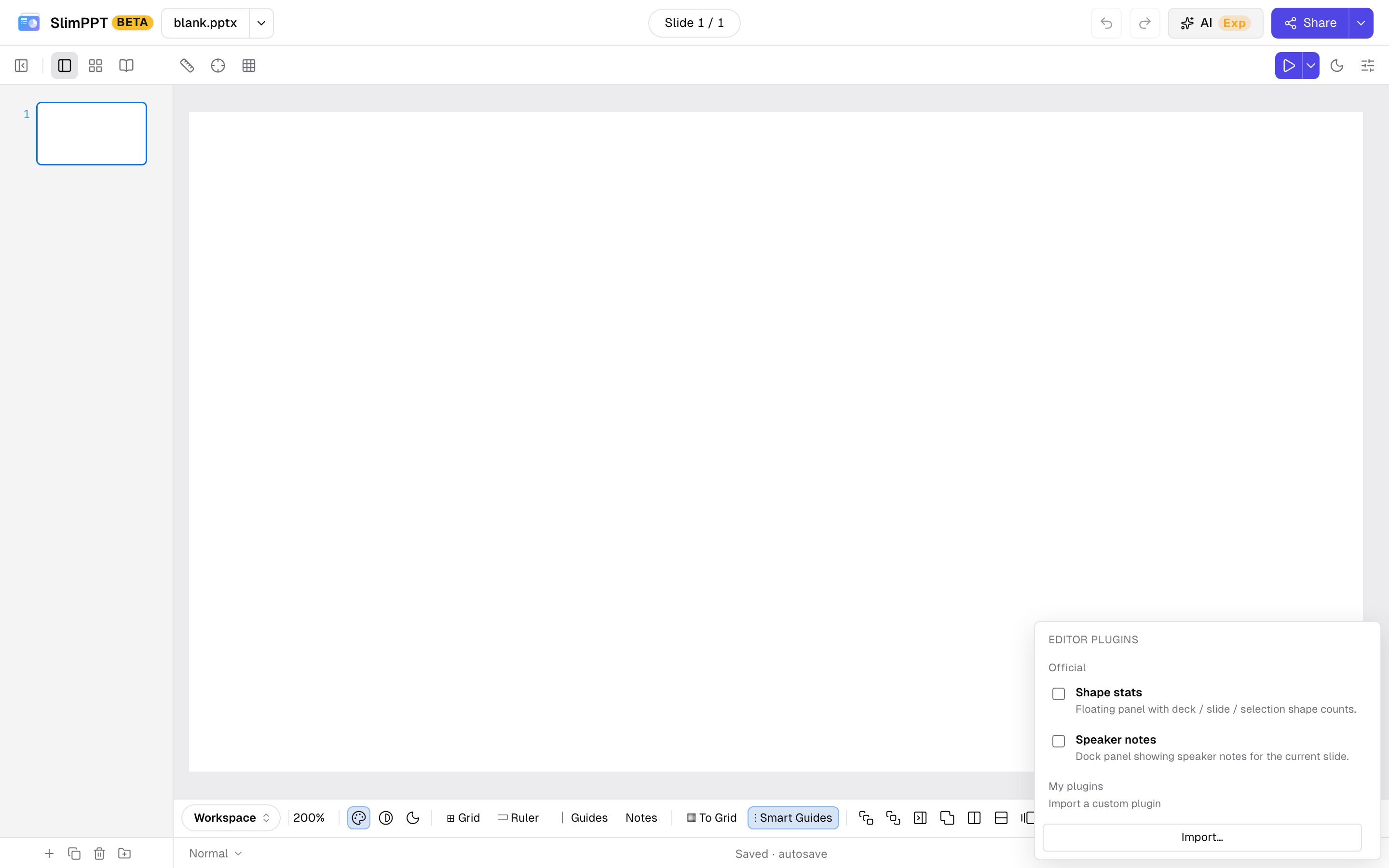
Official editor plugins ship with the editor. Their ids start with official:. You can use them without an account.
| Plugin | id | What it does |
|---|---|---|
| Shape stats | official:slide-stats | Counts shapes in the deck, on this slide, and in the selection |
| Speaker notes | official:speaker-notes | Shows the current slide’s speaker notes |
Imported plugins are files you add to your account. Sign in first. Each imported plugin is private to that account, and that cannot be changed. Importing does not turn the plugin on. Check it in the list.
Open Workspace → Add-ins. Official plugins are listed first. My plugins is the account list. Import… asks for a .js file. Delete removes it from the account.
Write one
The file calls defineEditorPlugin once. defineEditorPlugin and definePlaybackPlugin are already in scope when the editor loads the file. Do not import them.
id starts with a letter and may contain letters, digits, ., _, and -, up to 64 characters. It cannot contain :, so it cannot look like an official id. The file is at most 96 × 1024 characters. name is kept up to 80 characters. description is kept up to 240 characters. The same id imported again replaces the previous file.
defineEditorPlugin({
  id: "acme.wordCount",
  name: "Word count",
  description: "Characters on the current slide.",
  version: "1.0.0",
  activate(ctx) {
    const line = document.createElement("div");
    const panel = ctx.ui.addPanel({
      title: "Word count",
      render(body) {
        body.append(line);
      },
    });
    const refresh = () => {
      const pres = ctx.editor.getPresentation();
      const slide = pres.slides[ctx.editor.getSlideIndex()];
      let n = 0;
      for (const layer of slide?.layers ?? []) {
        for (const shape of layer.shapes) {
          if (shape.kind !== "text") continue;
          for (const para of shape.paragraphs ?? []) {
            for (const run of para.runs ?? []) n += run.text?.length ?? 0;
          }
        }
      }
      line.textContent = String(n);
    };
    const offSlide = ctx.events.on("slidechange", refresh);
    const offPres = ctx.events.on("presentationchange", refresh);
    refresh();
    return () => {
      offSlide();
      offPres();
      panel.remove();
    };
  },
});
activate can be async. Return a function to drop listeners. Panels and buttons are removed when the plugin is turned off. deactivate(), if you set it, runs after that function. It takes no arguments.
Plugin object
| Field | Type | Required | Meaning |
|---|---|---|---|
id | string | yes | Stable id. Letter, then letters, digits, ., _, -. No :. At most 64 characters |
name | string | no | Name in the Add-ins list. Falls back to id. Trimmed to 80 characters |
description | string | no | One line under the name. Trimmed to 240 characters |
version | string | no | Your own version string. The editor does not compare it |
activate | (ctx) => cleanup | void | Promise<cleanup | void> | yes | Called when the plugin is checked. cleanup is () => void |
deactivate | () => void | no | Called after cleanup, when the plugin is unchecked or replaced |
activate(ctx)
| Field | Type | Use |
|---|---|---|
ctx.presentation | deck | Same live deck as ctx.editor.getPresentation() |
ctx.editor | editor API | Read the deck, move the current slide, run undoable commands |
ctx.events | event bus | Slide, selection, command, and deck changes |
ctx.ui | UI host | Panels, buttons, and your own nodes |
ctx.shared | object | One bag shared by every editor plugin in this editor session |
ctx.locale | string | "en" or "zh-CN" |
ctx.log | (...args) => void | console.log, prefixed with [editor-plugin:<id>] |
Deck fields plugins usually read
ctx.presentation is the live deck, not a copy. Coordinates are slide pixels (size.width × size.height, often 1280 × 720).
| Field | Meaning |
|---|---|
id | Deck id |
size.width, size.height | Slide size in pixels |
slides | Slides in file order. Index 0 is the first slide |
slides[i].id, .name | Slide id and name |
slides[i].notes | Speaker notes, when the slide has them |
slides[i].show | false when the slide is hidden in the show |
slides[i].layers[].shapes | Shapes on that layer, bottom to top |
A shape has id, name, kind, bbox (x, y, w, h), visible, and opacity. kind is text, image, rect, ellipse, line, path, polygon, group, chart, video, audio, ole, model3d, or webEmbed. A text shape has paragraphs[].runs[].text. A group has children.
Change the deck with ctx.editor.execute, so the change can be undone. Writing fields in place does not go on the undo stack.
ctx.editor
| Function | Parameters | Returns | What it does |
|---|---|---|---|
getPresentation() | — | deck | The live deck |
getSlideIndex() | — | number | Current slide index, starting at 0 |
getSlideCount() | — | number | slides.length |
gotoSlide(index) | index: number | void | Shows that slide. Same index as getSlideIndex() |
getSelectedShapeIds() | — | string[] | Selected shape ids on the current slide |
execute(cmd) | cmd: EditCommand | void | Applies cmd and pushes it on the undo stack |
undo() | — | boolean | Undoes one command. false when the stack is empty |
redo() | — | boolean | Redoes one command. false when there is nothing to redo |
stackInfo() | — | { canUndo, canRedo, undoLabel?, redoLabel? } | Whether undo and redo are available, and the command labels |
stageElement() | — | HTMLElement | The canvas |
hostElement() | — | HTMLElement | The editor root. Use its ownerDocument to create nodes |
EditCommand:
| Field | Type | Meaning |
|---|---|---|
label | string | Shown in the history list. Also sent on the command event |
apply(pres) | (pres) => void | Makes the change. pres is the live deck |
revert(pres) | (pres) => void | Undoes that change |
ctx.editor.execute({
  label: "Rename slide",
  apply(pres) {
    pres.slides[ctx.editor.getSlideIndex()].name = "Renamed";
  },
  revert(pres) {
    pres.slides[ctx.editor.getSlideIndex()].name = "Slide 1";
  },
});
ctx.events
| Function | Parameters | Returns |
|---|---|---|
on(event, cb) | event is one of the names below. cb receives that event’s payload | () => void unsubscribe |
off(event, cb) | The same event and cb passed to on | void |
emitCurrentState() | — | void. Fires selectionchange and slidechange again with the current slide and selection |
activate often runs after the first slide event. Call your refresh once yourself, or call emitCurrentState().
| Event | Payload | When |
|---|---|---|
slidechange | { slideIndex: number, total: number } | The current slide changes. total is the slide count |
selectionchange | { slideIndex: number, shapeIds: string[] } | The selection changes |
command | { label: string, kind: "apply" | "undo" | "redo" } | A command is applied, undone, or redone |
presentationchange | none | The deck object is replaced |
destroy | none | The editor is going away. Cleanup runs after this |
ctx.ui
Each call returns { remove(): void }.
| Function | Parameters | Where it shows |
|---|---|---|
addPanel(opts) | See below | A floating panel at the bottom left of the canvas |
addRibbonButton(opts) | See below | A button at the top right of the canvas |
mount(node) | node: HTMLElement | Appends node to the editor root. You set its position |
addPanel:
| Field | Type | Required | Meaning |
|---|---|---|---|
title | string | yes | Panel heading. Clicking it collapses the body |
render | (body: HTMLElement) => void | yes | Fills the body. Called once, when the panel is created |
id | string | no | Stored on the panel element |
initialOpen | boolean | no | Body starts open unless this is false |
order | number | no | Accepted, and not used for sorting |
Panels stack in the order you call addPanel.
addRibbonButton:
| Field | Type | Required | Meaning |
|---|---|---|---|
label | string | yes | Button text |
onClick | (e: MouseEvent) => void | yes | Click handler |
tooltip | string | no | title. Defaults to label |
Editor plugins do not run in an exported HTML slideshow. For the slideshow, write a playback plugin.
While a collaboration room is open, shapes, text, slides, animations, and comments changed through execute sync to the other people and show up on their undo stack. Panels, buttons, and ctx.shared stay on this browser. Vote tallies, laser dots, and whiteboard strokes stay in that live present session. To keep them in the deck, run another command. See Collaboration.