
Playback plugins
A playback plugin runs during the slideshow. It can follow the current slide, move the show, read shapes on the slide, and add a panel, a toolbar button, or an overlay.
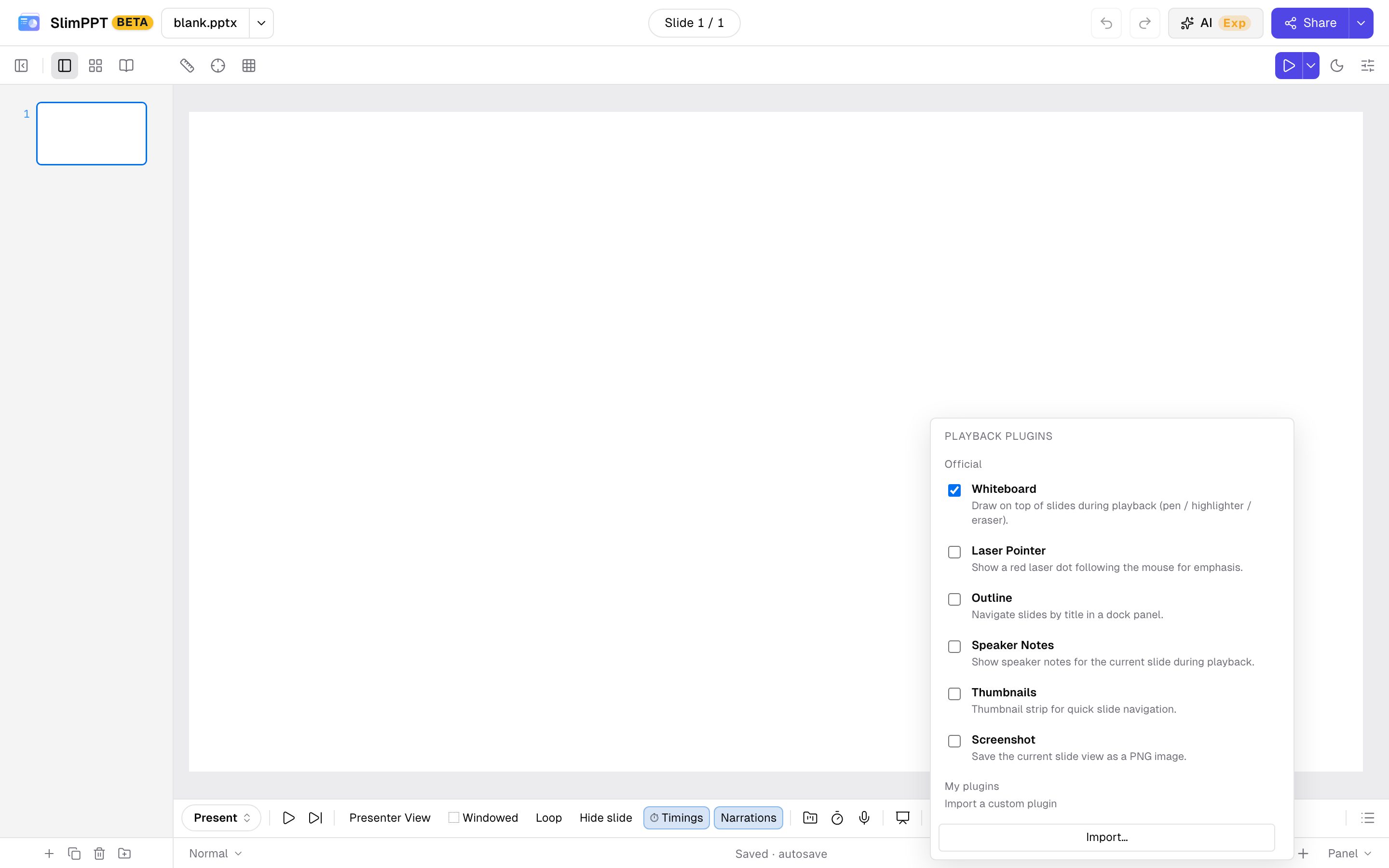
Official playback plugins ship with the editor. Their ids start with official:. You can use them without an account. Whiteboard is on by default.
| Plugin | id | What it does |
|---|---|---|
| Whiteboard | official:whiteboard | Pen, highlighter, and eraser on the slide |
| Laser pointer | official:laser-pointer | A red dot that follows the pointer |
| Outline | official:outline | Jump by slide title |
| Speaker notes | official:notes-panel | Notes for the slide being shown |
| Thumbnails | official:thumbnail-bar | A strip for jumping between slides |
| Screenshot | official:screenshot | Save the current slide as a PNG |
This speaker-notes plugin is only for the slideshow. The editor has a separate official plugin with the same job.
Imported plugins are files you add to your account. Sign in first. Each imported plugin is private to that account, and that cannot be changed. Importing does not turn the plugin on. Check it under Present → Plugins.
Import… asks for a .js file. Delete removes it from the account. The same id imported again replaces the previous file.
Write one
The file calls definePlaybackPlugin once. defineEditorPlugin and definePlaybackPlugin are already in scope when the editor loads the file. Do not import them, and do not call PPTPlayer.definePlugin. Exported HTML wires definePlaybackPlugin to the player for you.
id starts with a letter and may contain letters, digits, ., _, and -, up to 64 characters. It cannot contain :. The file is at most 96 × 1024 characters. name is kept up to 80 characters. description is kept up to 240 characters.
definePlaybackPlugin({
  id: "acme.hello",
  name: "Hello",
  description: "Shows the deck title during the slideshow.",
  version: "1.0.0",
  activate(ctx) {
    const panel = ctx.ui.addPanel({
      title: "Hello",
      render(body) {
        body.textContent = ctx.presentation.title || "Untitled";
      },
    });
    const off = ctx.events.on("slidechange", (ev) => {
      ctx.log(ev.slide.name);
    });
    return () => {
      off();
      panel.remove();
    };
  },
});
activate can be async. Return a function to drop listeners, timers, and UI. deactivate(), if you set it, runs after that function and takes no arguments.
The plugin runs in the page, with the same access as an official plugin.
Checked playback plugins are packed into HTML / HTML zip when the account is allowed to export plugins. Editor plugins are not included. See Export.
Plugin object
| Field | Type | Required | Meaning |
|---|---|---|---|
id | string | yes | Stable id. Letter, then letters, digits, ., _, -. No :. At most 64 characters |
name | string | no | Name in the Plugins list. Falls back to id. Trimmed to 80 characters |
description | string | no | One line under the name. Trimmed to 240 characters |
version | string | no | Your own version string |
activate | (ctx) => cleanup | void | Promise<cleanup | void> | yes | Called when the show starts with this plugin checked |
deactivate | () => void | no | Called after cleanup, when the show ends |
activate(ctx)
| Field | Use |
|---|---|
ctx.presentation | Slide list, size, title, notes. A snapshot from when the show started |
ctx.player | Move the show and its animation steps |
ctx.events | slidechange, stepchange, complete, destroy |
ctx.ui | Panels, toolbar buttons, overlays |
ctx.scene | Shapes on the current slide |
ctx.thumbnail | A vector thumbnail of any slide |
ctx.contextMenu | Items on the slideshow right-click menu |
ctx.live | Messages to other people in a live present room |
ctx.shared | One bag shared by every playback plugin in this show |
ctx.locale | "en" or "zh-CN" |
ctx.log(...args) | console.log, prefixed with [plugin:<id>] |
Two indexes show up everywhere:
- Visible index is the slide the audience is on, starting at
0. Hidden slides are skipped.ctx.player.gotoandslidechange.visibleIndexuse this index. - Absolute index is the position in
ctx.presentation.slides, which still includes hidden slides.ctx.presentation.visibleOrder[visibleIndex]is the absolute index.
activate often runs after the first slidechange. Read ctx.player.current(), or call ctx.events.emitCurrentSlide().
ctx.presentation
| Field | Type | Meaning |
|---|---|---|
id | string | Deck id |
size | { width: number, height: number } | Slide size in pixels |
title | string optional | Document title |
slides | SlideInfo[] | Every slide, in file order |
visibleOrder | number[] | Absolute indexes in show order |
meta | object optional | Document properties such as author and keywords |
SlideInfo:
| Field | Type | Meaning |
|---|---|---|
id | string | Slide id |
name | string | Slide name |
index | number | Absolute index |
visibleIndex | number | Place in the show. -1 when the slide is hidden |
show | boolean | false when the slide is hidden |
hasAnimations | boolean | The slide has steps you can advance |
totalAnimationSteps | number | Step count. 0 when there is no timing |
notes | string optional | Speaker notes |
transition | { kind: string, duration: number } optional | Transition name and duration in seconds |
ctx.player
| Function | Parameters | Returns | What it does |
|---|---|---|---|
next() | — | void | Advances one animation step. If the slide has no step left, goes to the next slide. On the last slide, fires complete |
prev() | — | void | Goes to the previous visible slide. Does not step backward through animations |
goto(visibleIndex) | visibleIndex: number | void | Jumps to that visible slide, starting at 0 |
gotoById(slideId) | slideId: string | boolean | Jumps by slide id. false when the id is missing |
current() | — | number | Current visible index |
total() | — | number | Number of visible slides |
nextStep() | — | boolean | Advances one click step and does not change slides. false when this slide has no step left |
triggerShape(shapeId) | shapeId: string | boolean | Plays that shape’s click animation. shapeId is ShapeInfo.id. false when it has none |
step() | — | { totalSteps: number, currentStep: number } | Animation progress on the current slide |
freezeActive() | — | void | Jumps every running step to its end state |
setNavigationLocked(locked) | locked: boolean | void | true turns off click, keyboard, shape-click, and hyperlink navigation. next() and goto() still work |
isNavigationLocked() | — | boolean | Whether that lock is on |
Unlock navigation in your cleanup if you locked it.
ctx.events
| Function | Parameters | Returns |
|---|---|---|
on(event, cb) | event is a name below. cb receives that event’s payload | () => void unsubscribe |
off(event, cb) | The same event and cb passed to on | void |
emitCurrentSlide() | — | void. Fires slidechange again for the slide on screen |
| Event | Payload | When |
|---|---|---|
slidechange | { visibleIndex, absoluteIndex, total, slide } | The show lands on a slide, including the first load, goto, next across slides, and hyperlinks. total is the visible slide count. slide is that slide’s SlideInfo |
stepchange | { visibleIndex, absoluteIndex, currentStep, totalSteps, frozen? } | An animation step moves forward or back. frozen is true when the step was jumped to its end |
complete | none | The show ends: advancing past the last slide, End Show, or an end-show hyperlink |
destroy | none | The player is going away. Cleanup runs after this |
ctx.scene
Shapes on the current slide, in slide pixels, not screen pixels. After a slide change these methods point at the new slide.
| Function | Parameters | Returns | What it does |
|---|---|---|---|
shapes() | — | ShapeInfo[] | Top-level shapes, bottom to top |
byName(name) | name: string | ShapeInfo | null | First shape with that exact name |
allByName(name) | name: string | ShapeInfo[] | Every shape with that exact name |
byId(id) | id: string | ShapeInfo | null | The shape with that render id |
hitTest(x, y) | x: number, y: number | ShapeInfo | null | Topmost visible shape at that slide point |
toSlideCoords(clientX, clientY) | clientX: number, clientY: number | { x, y } | null | Screen point to slide point. null before the stage has a size |
setVisible(id, visible) | id: string, visible: boolean | boolean | Shows or hides that shape. false when the id is missing |
setOpacity(id, opacity) | id: string, opacity: number | boolean | Opacity from 0 to 1. false when the id is missing |
triggerShape(id) | id: string | boolean | Same as ctx.player.triggerShape |
ShapeInfo:
| Field | Type | Meaning |
|---|---|---|
id | string | Render id, such as sp_12. Pass it to triggerShape |
name | string | The name in the selection pane |
kind | string | text, image, rect, ellipse, line, group, chart, and the other shape kinds |
bbox | { x, y, w, h } | Bounds in slide pixels |
visible | boolean | Whether it is currently shown |
text | string optional | Plain text, on text shapes and groups that contain text |
hasClickAnimation | boolean | triggerShape can play a click animation on it |
Name the shapes you need in the selection pane, then find them with byName.
ctx.ui
Each call that adds something returns { remove(): void }.
| Function | Parameters | Returns | What it does |
|---|---|---|---|
addPanel(opts) | See below | { remove() } | A collapsible panel in the dock |
addToolbarButton(opts) | See below | { remove() } | A button on the playback toolbar |
addOverlay(opts) | See below | { remove() } | HTML on top of the slide, in slide coordinates |
mount(node) | node: HTMLElement | { remove() } | Appends node to the player root |
setDockOpen(open) | open: boolean | void | Opens or closes the dock |
toggleDock() | — | void | Toggles the dock |
isDockOpen() | — | boolean | Whether the dock is open |
rootElement() | — | HTMLElement | Player root |
stageElement() | — | HTMLElement | The slide stage |
addPanel:
| Field | Type | Required | Meaning |
|---|---|---|---|
title | string | yes | Panel heading |
render | (body: HTMLElement) => void | yes | Fills the body once, when the panel is created |
id | string | no | Panel id |
initialOpen | boolean | no | Starts open unless this is false |
order | number | no | Smaller numbers sit higher. Default 100 |
addToolbarButton:
| Field | Type | Required | Meaning |
|---|---|---|---|
label | string | yes | Button text |
onClick | (e: MouseEvent) => void | yes | Click handler |
tooltip | string | no | Hover text |
position | "start" | "end" | no | Left or right side of the toolbar |
addOverlay:
| Field | Type | Required | Meaning |
|---|---|---|---|
node | HTMLElement | yes | The element to show |
bbox | { x, y, w, h } | no | Slide pixels. Omit it to cover the slide |
zIndex | number | no | Stacking order |
ctx.contextMenu
| Function | Parameters | Returns | What it does |
|---|---|---|---|
addItem(item) | item fields below | { remove() } | Adds one menu row |
open(x, y) | x: number, y: number screen pixels | void | Opens the menu at that point |
close() | — | void | Closes it |
addItem fields:
| Field | Type | Meaning |
|---|---|---|
id | string optional | Id used if you remove the row later |
kind | "item" | "checkbox" | "separator" | Default "item" |
label | string optional | Row text. A separator can omit it |
shortcut | string optional | Shown on the right, and bound while the show is running. No modifier keys. A single character, or ← → ↑ ↓ Esc Space Home End Enter F1 PageUp PageDown |
order | number optional | Smaller numbers sit higher. Default 100 |
group | string optional | Rows in different groups get a divider between them |
checked | boolean or () => boolean | Checkbox state. A function is read each time the menu opens |
disabled | boolean or () => boolean | A function is read each time the menu opens |
onClick | (e?: MouseEvent) => void | e is the right-click, with clientX and clientY |
ctx.thumbnail
target is a visible index (number), { visibleIndex }, { absoluteIndex }, or { id }.
| Function | Parameters | Returns | What it does |
|---|---|---|---|
mount(host, target, opts?) | host: HTMLElement. opts.transparent?: boolean | { element: SVGSVGElement, destroy() } | Draws the thumbnail into host. Give host a fixed size. Call destroy() to remove it |
toSvgString(target, opts?) | same opts | string | SVG markup |
toSvgBlob(target, opts?) | same opts | Blob | image/svg+xml |
toDataUrl(target, opts?) | same opts | string | SVG data URL |
clearCache() | — | void | Drops cached thumbnails |
byVisibleIndex, byAbsoluteIndex, byId, and dataUrlByVisibleIndex still exist and return a Promise. New plugins should use mount or toSvgBlob.
ctx.live
Empty when this show is not a live present session. send then does nothing, and attached() is false.
| Function | Parameters | Returns | What it does |
|---|---|---|---|
attached() | — | boolean | true when this browser is the host, or an admitted viewer |
send(data, opts?) | data: unknown. opts.snap?: boolean | void | Sends data to the rest of the room. snap: true keeps the latest payload for someone who joins late |
on(fn) | fn: (data, meta: { from: string }) => void | () => void unsubscribe | Another participant sent a message |
onAttach(fn) | fn: (attached: boolean) => void | () => void unsubscribe | The live channel connected or dropped. On connect, send your current state with snap: true |
In a live present session, the host page syncs slide changes, animation steps, and embedded media. ctx.live carries this plugin's own messages. The host and every admitted viewer can send and receive.
data is dropped when its JSON text is longer than 65536 characters. snap: true keeps only this plugin's latest payload. Someone who joins late receives that payload when the channel connects. On connect, send the current state again from onAttach.
setVisible and setOpacity apply on the browser that called them. To show the same result to the room, call them again inside on.
Whiteboard sends one snapshot of the strokes on every slide, with snap: true. Laser pointer sends slide coordinates and draws one dot per meta.from. Releasing the pointer sends a snapshot that turns the dot off.
| Idea | What to send | snap |
|---|---|---|
| Tally votes | { t: "vote", q, choice }. Count one vote per from | Send the current question number when it changes |
| Reveal | { t: "show", id, visible }. On receipt, setVisible or triggerShape | Yes. Late joiners match shapes already revealed |
| Questions | One line from a panel. The host lists them by from | Yes, while the queue is still on screen |
| Reactions | { t: "emoji", emoji }. Show it briefly on an overlay | No. Late joiners do not need a reaction that already faded |
| Countdown | An end time. Each browser subtracts it from the local clock | Yes |
| Spotlight | Slide coordinates, drawn as a circle | Send an off snapshot when the pointer is released |
The host page and the audience page run the playback plugins packed into this session's snapshot. After you change a checkmark or the source, push the snapshot again before the room runs the new plugin. When the plan allows plugins in export, checked playback plugins are written into that HTML. See Export.
During a local show, and in exported HTML opened outside a live room, the channel is empty and the plugin still runs.
definePlaybackPlugin({
  id: "acme.vote",
  name: "Tally",
  activate(ctx) {
    const tally = new Map();
    const off = ctx.live.on((data, meta) => {
      if (!data || data.t !== "vote") return;
      tally.set(meta.from, data.choice);
      ctx.log(tally.size);
    });
    const offAttach = ctx.live.onAttach((on) => {
      if (on) ctx.live.send({ t: "q", n: 1 }, { snap: true });
    });
    const button = ctx.ui.addToolbarButton({
      label: "A",
      onClick() {
        ctx.live.send({ t: "vote", q: 1, choice: "A" });
      },
    });
    return () => {
      off();
      offAttach();
      button.remove();
    };
  },
});ctx.shared, ctx.locale, ctx.log
ctx.shared is one object for every plugin in this show. ctx.shared["ppt:fileName"] is the file name when the editor started the show. ctx.locale is "en" or "zh-CN". ctx.log(...) prints with a [plugin:<id>] prefix.